


Description
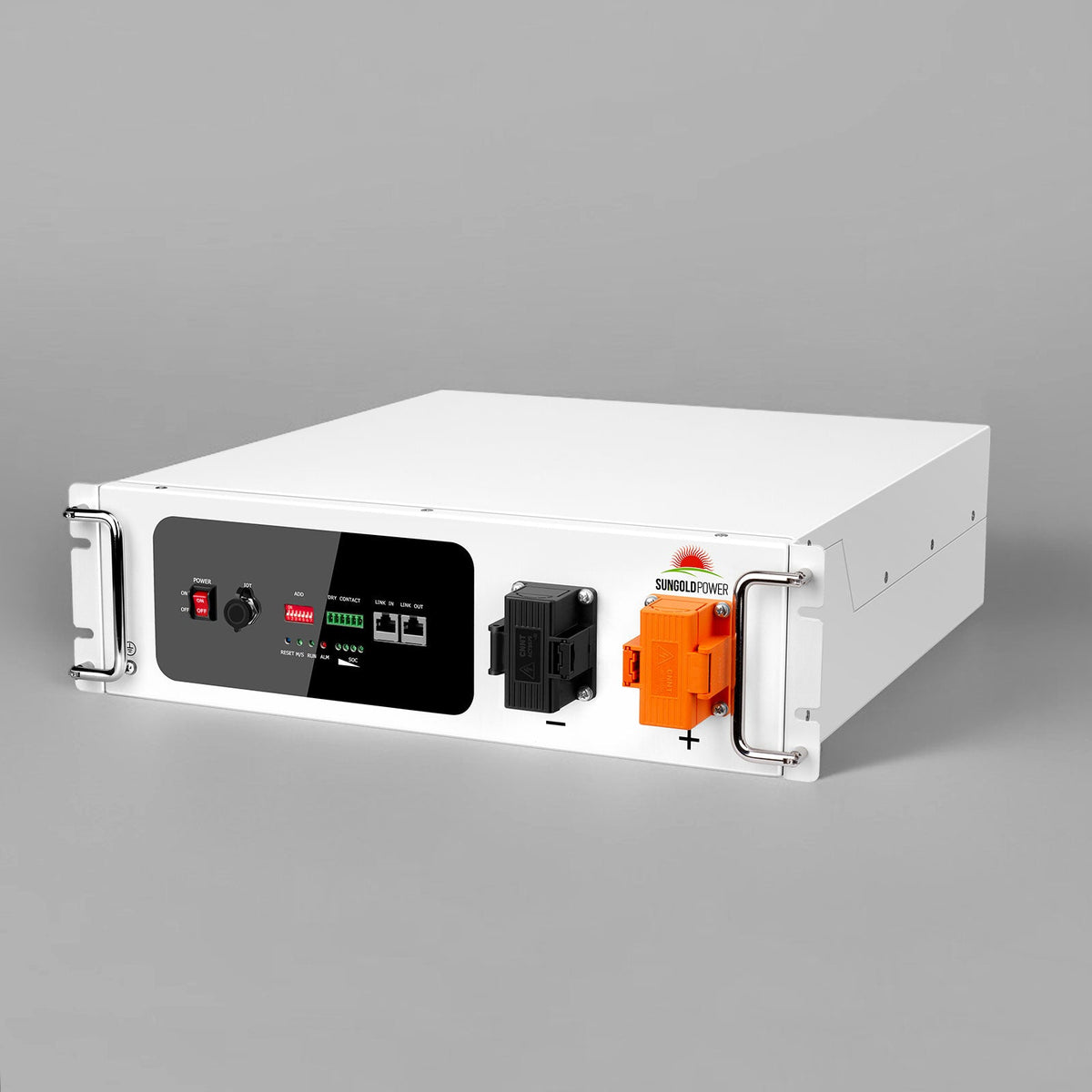
SGH48100T Server Rack 48V 100AH Lithium Battery Self-Heating


The SGH48100T Server Rack 48V 100AH Lithium Battery Self-Heating from SunGoldPower is a compact lithium iron phosphate (LiFePO4) energy storage battery designed for residential, small commercial, and industrial applications. With a rated voltage of 51.2V, a capacity of 100Ah, and 5.12kWh of nominal energy storage, it provides a flexible solution for compatible solar energy systems, backup power, and off-grid installations.
The SGH48100T features an integrated self-heating system designed to support battery operation in low-temperature environments. Its intelligent Battery Management System (BMS) provides multiple electrical and temperature protection functions, while CAN and RS485 communication allow integration with compatible inverter systems.
Designed in a compact 3U server-rack configuration, the battery supports up to 32 units connected in parallel for expanded energy storage capacity. With more than 7,000 advertised deep cycles, an expected lifespan of up to 15 years, and a 10-year warranty, it offers a durable energy storage option for compatible installations.
Available purchase quantities include 1 unit, 2 units, and 4 units.
Key Features


Specifications
- Battery Chemistry: Lithium Iron Phosphate (LiFePO4)
- Rated Voltage: 51.2V
- Maximum Voltage Range: 44.8–57.6V
- Charge Voltage: 56.0V
- Float Charge Voltage: 54.6V
- Nominal Energy at 0.5C: 5.12kWh
- Usable Energy at 0.5C: 4.92kWh
- Nominal Capacity at 0.5C: 100Ah
- Dimensions: 490 × 441 × 133 mm (19.3 × 17.3 × 5.2 inches)
- Weight: Approximately 47 kg (103 lb)
- Standard Charging Current: ≤50A
- Maximum Charging Current: 70A
- Standard Discharging Current: ≤50A
- Maximum Discharging Current: 100A (initial temperature ≤86°F / 30°C)
- Peak Discharging Current: 101–119A @ 5 minutes; 120–200A @ 15 seconds
- Communication Interfaces: RS485 / CAN
- Maximum Parallel Connection: 32 batteries
- Charging Operating Temperature: 14°F to 122°F (-10°C to 50°C)
- Discharging Operating Temperature: -4°F to 122°F (-20°C to 50°C)
- Heating Activation Conditions: -13°F (-25°C) ≤ T ≤ 41°F (5°C), at I ≥ 0.08C
- Heating Completion Temperature: ≥53.6°F (12°C)
- Recommended Environmental Temperature: 59°F to 95°F (15°C to 35°C)
- Recommended Environmental Humidity: 5–75% RH
- Optimal Operating Temperature: 59°F to 86°F (15°C to 30°C)
- Maximum Operating Altitude: Less than 3000 m
- Battery Configuration: 3U Server Rack
- Cycle Life: Over 7,000 deep cycles
- Expected Lifespan: Up to 15 years
- Maximum Depth of Discharge for Off-Grid and Backup Applications: 96%
- Storage Temperature in OFF Mode — Less Than 6 Months: 32°F (0°C) < T < 86°F (30°C)
- Storage Temperature in OFF Mode — Less Than 3 Months: 14°F (-10°C) < T < 113°F (45°C)


How to Use
Important: Installation and electrical commissioning must be performed by qualified personnel. Follow the complete SGH48100T operating and maintenance manual and the requirements of the connected equipment.
Step 1: Inspect the Battery
-
Check the battery packaging and enclosure for visible damage.
-
Confirm that the delivered components are complete.
-
Inspect the battery for abnormalities, including swelling or physical damage.
-
Contact the supplier if any components are damaged or missing.
Step 2: Prepare the Installation Location
-
Choose a suitable rack or cabinet.
-
Confirm that it can support the battery's weight.
-
Ensure sufficient installation space.
-
Keep the battery away from water, direct sunlight, rain, snow, heat sources, and flammable materials.
-
Confirm that the installation location meets the specified environmental requirements.
Step 3: Install the Battery
-
Remove the battery from its packaging.
-
Prepare the battery rack or cabinet.
-
Position the rack or cabinet horizontally in a suitable location.
-
Carefully lift the battery onto the rack or cabinet tray.
-
Install and tighten the mounting screws.
-
Confirm that the battery is stable and securely installed.
Do not install the battery upside down or rotated onto either side.
Step 4: Prepare for Electrical Connections
-
Confirm that all battery modules are switched OFF.
-
Check that the installation is secure.
-
Verify that the power and communication cable accessories are correct.
-
Individually switch on each battery to check for alarms or protection warnings.
-
Switch off all batteries again before wiring.
Step 5: Connect the Grounding Cable
-
Locate the grounding connection on the battery panel.
-
Remove the grounding screw.
-
Position the grounding cable conductor.
-
Secure the grounding connection.
-
For multiple batteries, connect the grounding cable to the next battery module according to the manual.
Step 6: Connect Communication Cables
For multiple batteries:
-
Identify the master battery.
-
Connect the master battery's Link OUT port to the next battery's Link IN port.
-
Continue connecting additional batteries in the specified sequence.
-
Confirm that all communication connections are secure.
Step 7: Connect the DC Power Cables
-
Prepare the required battery power cables.
-
Identify the appropriate positive and negative terminals.
-
Connect the power cables according to the approved wiring configuration.
-
Secure the cable terminals using the appropriate hardware.
Step 8: Connect the Battery to the Inverter
A qualified installer must:
-
Confirm that the inverter AC and photovoltaic inputs are disconnected.
-
Ensure that the inverter or charger's DC and signal switches are OFF.
-
Connect the master battery's communication port to the corresponding inverter CAN or RS485 interface.
-
Connect the battery positive output to the inverter battery positive input.
-
Connect the battery negative output to the inverter battery negative input.
-
Verify that the electrical connections match the approved wiring arrangement.
Step 9: Commission the Battery System
After all installation checks and connections are complete:
-
Configure the master battery's DIP settings according to the compatible inverter protocol.
-
Switch on the battery modules.
-
Wait 10 seconds.
-
Verify the master battery status indicator.
-
Turn on the battery-to-inverter breaker, if installed.
-
Turn on the inverter or charger isolator.
-
Complete the required inverter or charger settings.
-
Confirm that the battery system operates normally.
Step 10: Monitor Battery Operation
Use the battery status indicators to monitor:
-
Battery operating status
-
State of charge (SOC)
-
Alarm conditions
-
Protection status
-
Master and slave battery status
Step 11: Power Off the Battery
Follow the specified shutdown sequence:
-
Turn off the inverter.
-
Turn off the battery disconnection breaker, if installed.
-
Turn off the signal switches on all battery modules.
Step 12: Follow Storage Requirements
For extended storage:
-
Store the battery in a dry, clean, dark, and well-ventilated indoor environment.
-
Keep it away from flammable materials and corrosive substances.
-
Maintain a state of charge close to 50%.
-
Avoid storing the battery above 80% SOC for extended periods.
-
Recharge the battery every 6 months when not in use.
Compatibility
Supported Applications: Compatible on-grid, backup, and off-grid energy storage systems.
Communication Interfaces: CAN and RS485.

Inverter Brands Listed by the Manufacturer:
-
Growatt
-
Deye
-
Sol-Ark
-
SunGoldPower
-
Luxpower
-
EG4
-
Victron Energy
-
Schneider
-
SMA
-
Solis
Parallel Battery Expansion: Supports up to 32 compatible battery units connected in parallel.
Specific inverter compatibility depends on the supported electrical specifications, communication protocols, and configuration requirements.
Included
The official SGH48100T user manual identifies the following components in the delivery package:
-
1 × SGH48100T Battery Pack
-
1 × User Manual
-
6 × M6 Float Nuts
-
Rack-Mounting Hardware
-
Power Cable Accessories
-
Grounding Cable
-
Battery-to-Battery Communication Cable
Product Support
- Server Rack 48V 100AH Lithium Battery SGH48100T User Manual
- Server Rack 48V 100AH Lithium Battery SGH48100T UL1973 Certification

Warranty
Warranty & Support
Price Match Guarantee
Payment & Security
Your payment information is processed securely. We do not store credit card details nor have access to your credit card information.